Showing posts with label internet. Show all posts
New Features Enhance Twitter

New Features Enhance Twitter


Twitter this week finished adding features that make the user can see anyone who likes their posts, and what he follow other people on the microblogging site.

"Now you can see when someone likes (annotate favorite mark) or one to retweet your tweets," said Twitter via his blog, as quoted on Wednesday (11/16/2011).

Probably not many are aware of this change. Twitter is mentioned, the change has actually been released in stages since last August. "And this change has been released this week perfect," added Twitter.

According to Twitter, with this addition, users can also study the tweet like what is most interesting and inspiring others.

These additional functions like News Feed and Ticker on Facebook. By clicking 'username', where users can view the tweets that are retweets of others. In this tab users can also see who's calling (mention) and to follow them. While clicking on the tab 'activity', will show a summary of what is to follow-by-follow accounts on the user.

"This feature provides more sources of information by displaying a Favorite, Retweet and Follow the latest from the people you follow on Twitter. All in one place," said Twitter.

Remove A Google Sitelink From SERPs


[1] First of all , login to your Google Webmaster account . [ Click here to login ]


[2] Then click on the desired website and click on " Site Configuration " at the left . And then click on " Sitelinks " .


[3] After that , you will be taken to the Sitelinks Management Page . There you will find two blank boxes , one box will allow you to demote a particular sitelink . Just put the URL you want remove from Google sitelinks in the second box and click on " Demote " .


[4] After that , your submitted URL will be demoted from Google sitelinks for a particular period of time .


In the same way , you can add upto 100 demotions at the same time . I hope that this article will certainly help you . Do share about your views through commenting !

Get Approved By BuySellAds


Now , let's have a look at their minimum requirements for publishers or website owners :-:

* Your website or blog should have at least 50,000 impressions per month .
* Your website must be live , finished and have fresh or updated content .
* Your website must not contain any porn , illegal and questionable content .
* Your website must be in English . If your website is Non-English , then that website should have extremely high traffic and impressions .
* Your website should be clean and arranged .
* The submitted website should have a standard domain like .com , .net etc.

Although , these are mentioned in their official website but I think that all these are not followed . If you have a site with around 10,000 impressions per month along with some good content , they your website may be get approved . I did not get approved by them in the first time I have applied for it , but I only got approval after trying a lots of time . Now I am going to share with you some tips on getting approval from BuySellAds . Well these are based on my own experience , here are the tips that needs to be followed :-

* Try to apply using a standard domain as the subdomains are not allowed . But , you can also use any standard and free domain like .TK , .CU etc. rather that applying with a .blogspot or .wordpress subdomain .

* Post some effective and fresh content before applying for it . Show them the importance and informativeness of your website .

* Keep a well-designed template or theme for your website and keep your widgets arranged .

* Don't put too many untargeted ads on your website before applying for an account . Remember that the top right sidebar should be ads-free as it is the most appropriate place of selling ads .

* Try to grab around 5,000 impressions per month so that your website can be determined as a good website .

* Your website must have a good Pagerank and Alexa rank . So , before applying for an BSA account , try to grab some good rank for your website .

* Try to obtain a good amount of Twitter followers , RSS subscribers and Facebook fans so as to get approved easily .

* And at last , I want to say that don't ever give up . Keep trying again and again , finally you will be get approved .

I think that these tips will surely help the bloggers and website owners to get approval from BuySellAds easily . So , Best of luck guys !
Popular Keywords in This Week On Google

Popular Keywords in This Week On Google


Below is the keyword this week's most popular google.ups, labor day, desktop backgrounds, wii u, Peyton Manning, texas am football, bohemian rhapsody, shame, wings, queen is a lot of keywords in google.We will appear in informed keyword from rank 1 to the 10.This is his keyword.

1.      ups
2.     labor day
3.     desktop backgrounds
4.     wii u
5.     peyton manning
6.     texas a m football
7.     bohemian rhapsody
8.     shame
9.     wings
10.    queen

Free Download New Keylogger 2011 Full Version

Free Download New Keylogger 2011 Full Version 

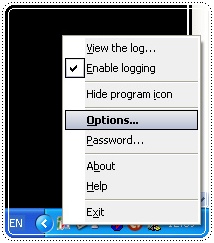
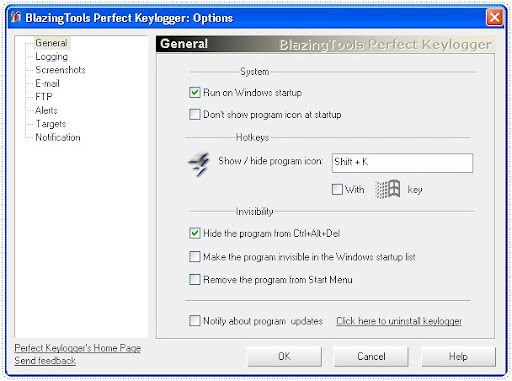
Step-by-step installation latest keylogger is as follows:
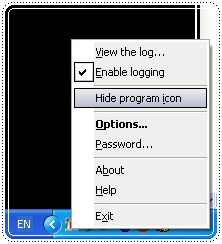
Download first program Blazing Tools Perfect Keylogger v1.7.5.0 through the link below. Install like installing programs that other applications (I'm sure you'll be able to) Completed installed please right click the program tray icon in Windows taskbar and select Options


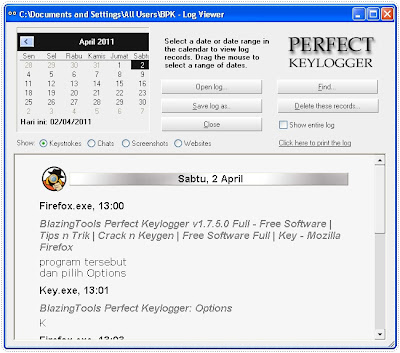
Keylogger is a hacking program that works to record keyboard typed, all computer activity in the media in the form of text and images (screenshots). The average program will be a stealth mode so that computer users can not recognize whether the computer was fitted with a keylogger or not. Next thing I know all the data he had entered into a computer is known by someone else who is none other than the installer program.


Download


http://ilmu-komputer23.blogspot.com/

New Cheat Point Blank 2011


Download Point Blank August 31, 2011 Chibi V. 2.0 31082011

Password :chibimaximus


Download Cheat Point Blank e991

 password : e991

What is Ragnarok Online?

What is Ragnarok Online?

Ragnarok Online, one of MPOGCG (Multi Player Online Game Community) or the Indonesian language "The game of many players in Online. "The game is inspired by Korean comic, titled 'Ragnarök' written by Myung-Jin Lee with a combination of 2D and 3D display nuanced Oriental with Background Sound Effects and interesting. Basically this game type RPG (Role Playing Game) that gameplay systemnya interesting because it has a professional system and a wide kinds of special abilities (skills) are manifold. In addition Ragnarok Online developed by Gravity Corp, and in Indonenia provided by PT Lyto, has benar2 attractive appearance, each player can modify the appearance of gender and hair style and color, resulting in 72 combinations plus accessories that can be purchased at toko2 in game renders. each player becomes a personal, unique.

No less important in the game, the players can communicate and interact with others and even form a chat room (chat) and team up to fight monsters, monsters that exist. With the above advantages tetrsebut no wonder then Ragnarok Online is played by hundreds of thousands or even millions of players on this earth. How to play quite simple, each player can download the software on the site Ragnarok www.ragnarok.co.id and then register online at the site was also to obtain IDs and passwords.
Congratulations to play and meet you there! Before downloading the software / CD-ROM buy Ragnarok Online a good idea to check the minimum computer system required to play this game.

Computer systems are needed First of all before the intention to join the play Ragnarok Online Please check the necessary computer systems. if your computer meets Minimum system required Ragnarok Online and has been downloaded and install software Ragnarok Online, then you are ready to play. Minimum Computer System: -Pentium II 400 MHz or better -Direct Sound Compatible / Support 3D sound Effects - Graphics should have the 3D capabilities with 8MB of Video Ram -Microsoft DirectX 8.0, Windows 95/98/ME/2000/2003 Server / XP or newer We recommend: -Pentium III 600 MHz or better -128 + MB RAM -Creative Sound Blaster Live! -Geforce 2, Voodoo4 / 5, or ATI Radeon with 16MB of VRAM or better -Microsoft DirectX 8.0, Windows 2000/XP - The speakers are good with a good subwoofer anyway -Logitech iTouch Cordless Keyboard, Logitech Cordless Optical Mouse Monitor 17-inch or larger -Seats are comfortable and soft. -A lot of snacks like Cheetos, Taro, and soft drink! Ragnarok Online, one of MPOGCG (Multi Player Online Game Community) or the Indonesian language "The game of many players in
Online. "The game is inspired by Korean comic, titled 'Ragnarök' written by Myung-Jin Lee with a combination of 2D and 3D display nuanced
Oriental with Background Sound Effects and interesting.

Basically this game type RPG (Role Playing Game) that gameplay systemnya interesting because it has a professional system and a wide
kinds of special abilities (skills) are manifold. In addition Ragnarok Online developed by Gravity Corp, and in Indonenia provided by PT Lyto, has benar2 attractive appearance, each player can modify the appearance of gender and hair style and color, resulting in 72 combinations plus accessories that can be purchased at toko2 in game renders. each player becomes a personal, unique.

No less important in the game, the players can communicate and interact with others and even form a chat room (chat) and team up to fight monsters, monsters that exist. With the above advantages tetrsebut no wonder then Ragnarok Online is played by hundreds of thousands or even millions of players on this earth.

How to play quite simple, each player can download the software on the site Ragnarok www.ragnarok.co.id and then
register online at the site was also to obtain IDs and passwords. Congratulations to play and meet you there!

Before downloading the software / CD-ROM buy Ragnarok Online
a good idea to check the minimum computer system required
to play this game.

Computer systems are needed

First of all before the intention to join the play Ragnarok Online
Please check the necessary computer systems. if your computer meets
Minimum system required Ragnarok Online and has been downloaded and
install software Ragnarok Online, then you are ready to play.

Minimum Computer System:
-Pentium II 400 MHz or better
-Direct Sound Compatible / Support 3D sound Effects
- Graphics should have the 3D capabilities with 8MB of Video Ram
-Microsoft DirectX 8.0, Windows 95/98/ME/2000/2003 Server / XP or newer

We recommend:
-Pentium III 600 MHz or better
-128 + MB RAM
-Creative Sound Blaster Live!
-Geforce 2, Voodoo4 / 5, or ATI Radeon with 16MB of VRAM or better
-Microsoft DirectX 8.0, Windows 2000/XP
- The speakers are good with a good subwoofer anyway
-Logitech iTouch Cordless Keyboard, Logitech Cordless Optical Mouse
Monitor 17-inch or larger
-Seats are comfortable and soft.
-A lot of snacks like Cheetos, Taro, and soft drink!